Showing posts with label Blogger Tips. Show all posts

Friday, 15 August 2014

How to Maximize Your Blog's Reach By Malik Awais

By on 20:58
Hy guys in today's post we will learn how to maximize your blog's reaches .With blogging becoming such a trend in today’s world, there are more and more people turning to it, seeking a second source of income. With so much competition how can you get your blog to stand out above the rest? It’s more then just writing a good article. Below are some tips on how to get your blog post noticed.
1. Maximize the SEO of Each Blog
We all know that websites need to be optimized for search engine’s keyword results. But what about each individual blog post? As each post is a page within a site it can be optimized to answer search results also. This can indirectly lead people back to your main page and help increase traffic to your blog. By understanding what people are looking for online, you can optimize your blog to answer their enquiries. Therefore you blog could actually rank for that particular question and this can increase the reach of your blog.
2. Promoting You Blog Through Social Media
Clearly the world is going more social. Social media was more commonly used by smaller business as a cheaper form of marketing. It provided a quicker and more direct form of communication to their consumers. As the convenience of social media has grown in popularity, it has prompted for larger organizations to use social media. Instead of the traditional methods of communication such as emails and phones.

This shows how important it is to promote your blog posts on social media. It’s no longer good enough to do blogging as a side project. Your readers want to know who you are and most readers would not hesitate to do a little research on social platforms first. Sharing your blog on social media is just the new age way of word of mouth advertising. The benefits of social media are that it has a wider reach as many users have public profiles. Allowing for your blog to be shared and re-shared.

The importance of a business’s online image plays such a major role, in its success, that there are many dishonest websites emerging and taking advantage of this market. Although social sharing is important you should not give in to the temptation of buying likes, shares or re-tweets. This sort of business has sprung up, all across the world, from countries like Canada, Brazil and Spain. It is also commonly sold through sites like fiverr. It is dodgy and a waste of money as it does not give you real fans, they will never interact with you on your blog.

When real people read and share or re-tweet your blog it creates organic links that also help with your search engine rankings. This new form of linking is said to be the future of SEO.
3. Social Platforms are Search Engines Too
Many more people are looking for answers on social platforms rather then a search engine. Youtube is now the second largest search engine in the world and it is a video sharing social platform. By promoting your blog on social media it allows for more people to find your blog and become a follower.

Thanks For Learning This Post !!

Saturday, 12 July 2014

How to Add Contact Form Widget to Blogger By Malik Awais

By on 20:54
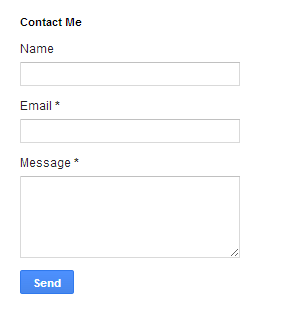
Today's post we discuss about How to add contact form widget to blogger on your contact us page. Blogger provide you to add contact us form at your page directly no longer used 3rd party contact form. Blogger has add new contact us form widget fit to blog sidebar and pages. You can also customize it on a separate page if you want to add only on page.
How to Add Contact Form to Blogger
Every blogger want to add contact us form easily because contact us form need on every blog to drop a message by visitor. If you need to getting suggestions, feedback or queries from visitors than add this contact form on your blog and visitor drop direct message for you.

How to Add Contact us widget to Blogger

You can add contact us widget to blogger easily with follow below steps:

Step 1

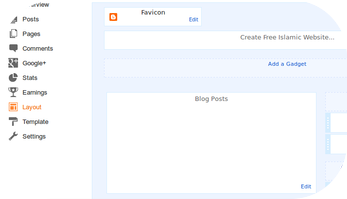
Log in into Blogger Dashboard and Go to Layout as shown in below picture.

How to Add Contact Form to Blogger

Step 2

Click on add a gadget link and select more from left menu as shown in below picture.

How to Add Contact Form to Blogger

Step 3

Add contact Form from the right side list as shown in below picture.

How to Add Contact Form to Blogger

Step 4

Set Title for Contact us form.

How to Add Contact Form to Blogger

Step 5

Click on save button.

Elegant Popular Posts Widget for Blogger By Malik Awais

By on 20:51
Today we provide you Elegant Popular Posts Widget for your Blogger blog. If you want to this than we provide you full working codes. Popular post widget is most important part of blog because popular post widget shows most popular posts of your blog for your visitors. I have already provided you some popular post widget and now I am provide you another popular post widget for your blogger blog.
Elegant Popular Posts Widget for Blogger

Popular Posts Widget for Blogger

Follow below steps how install Elegant Popular Posts Widget for your Blogger blog:

Step 1

Login into your Blogger Account. Go to Your Blogger Dashboard and Click on Layout tab at the left side panel. Now click on Add a Gadget Link like below picture.
Elegant Popular Posts Widget for Blogger

Step 2

After click on Add a Gadget Link a popup window will open with all available gadgets. Select popular post widgets from gadgets list. See below picture for more help.
Popular Posts Widget for Blogger

Step 3

Now Go to Template & click on Edit HTML button as shown in below picture.Popular Posts Widget

Step 4

Now search below code with the help of CTRL + F:
]]></b:skin>

Step 5

Now paste below code just above ]]></b:skin>
/* Popular Posts Widget customized by haakblog.com */
.PopularPosts .item-thumbnail { display: block; height: 190px; margin: 0; overflow: hidden; position: relative; width: 100%; }
.PopularPosts .item-title { position: relative; }
.PopularPosts img { display: block; height: auto; position: absolute; width:auto; transition: all 1s ease 0s; }
.item-title a { background:rgba(0, 0, 0, 0.35); color: #FFFFFF; font-family: Impact; font-size: 17px; font-weight: 100; padding: 10px 0; position: absolute; right: 0; text-align: center; top: 30px; width: 100%; }
.item-snippet { background:rgba(0, 0, 0, 0.35); color: #FFFFFF; font-weight: 900; left: 12%; padding: 10px; position: absolute; text-align: center; top: 95px; width: 70%; }
.item-content:hover img {transform: rotate(10deg) scale(1.2);}
.item-content { position: relative; }

Step 6

Now search </body> and paste below given code just above it:
<script src='//ajax.googleapis.com/ajax/libs/jquery/2.0.0/jquery.min.js'/>
<script type='text/javascript'>
 $(document).ready(function() {$(&#39;.PopularPosts img&#39;).attr(&#39;src&#39;, function(i, src) {return src.replace( &#39;s72-c&#39;, &#39;s400&#39; );});});
</script>
    <script type='text/javascript'>
    //<![CDATA[
    // Popular Posts customization by haakblog.com
    // Trim Code by MS-potilas 2012
    $('.popular-posts ul li .item-snippet').each(function(){
     var txt=$(this).text().substr(0,120);
      var j=txt.lastIndexOf(' ');
      if(j>10)
         $(this).text(txt.substr(0,j).replace(/[?,!\.-:;]*$/,'...'));
    });
    //]]>
    </script>

Step 7

Now Save Template button.

Thanks For Watching

Free Blogger Website Templates Provider Sites By Malik Awais

By on 20:44
Some of my blog reader wants to know where they can find free blogger website templates for their blog so today we are giving some Free Blogger Templates Provider websites. Blogger is best blogging platform for that user who wants to create free blog without hosting or want to create blog with sub domain name. After creating their blog on BlogSpot many bloggers want free blogger templates for their blog so we are providing some free blogger templates source for our user who need free blogger templates for their blog. You can easily find your free templates on those sites and easily customize according to your blog. Free Blogger Website Templates List
Below we are providing some Free Blogger Website Templates sites for you:

Btemplates.com

Free Blogger Website Templates Provider

Btemplates has largest free blogger website templates provider who provides free blogger templates for your blog. You can easily view and download templates from btemplates.com websites. You can also customize code according to your website. Btamlates provide direct download link of blogger xml templates.

Loefa-Cebook.com
Free Blogger Website Templates

Loefa Cebook provides blogger templates for your blog and you can download all templates directly from their website Loefa-Cebook.com. All blogger templates are free and you can also customize all templates as your websites.

Djogzs.com

Blogger Website Templates

Djogzs.com has one of largest free blogger website templates in his blog. He mainly creates free blogger templates and provides links for download. You can easily download free blogger templates for your blog here.

Uongjowo.blogspot.com

Free Website Templates

Uong Jowo also provides free blogger templates for BlogSpot websites. Uong Jowo gives some specific blogger templates and you can view demo of every templates. Uong Jowo also gives you direct download link of templates for you.

Themeforest.com

Free Blogger Templates

Theme forest well known website which are provide blogger templates as well as word press themes. This website not provides free blogger templates but we include this because some blogger want unique and good looking blogger templates in reasonable rates. You can buy blogger templates from theme forest in reasonable rates. Blogger developer adds some unique and good looking blogger templates in theme forest website at low price.

Thanks For Watching

How To Disable Right Click on Blogger/BlogSpot By Malik Awais

By on 20:40
In this tutorial we provide you simple blogger tricks on how to Disable Right Click on Blogger/BlogSpot blogs easily. You can easily manage copyright issue from disabling right click on your blog. Disable Right Click easily avoid users to copying your blog content, images etc. This is very simple blogger tricks to avoid copyright issue from blog. Many blogger noticing that most of blogs copied their blog content so they want protect their blog from copying and Disable Right click is very good idea to avoid this.
Disable right click becomes a disadvantage that if you disable right click than your sharing codes on blog post also not copied from blog post. So first think about this than applied this code on your blog or you can also remove this code easily if you don’t want more this on your blog.

Disable Mouse Right click on Blogger or BlogSpot Blogs

Please follow below steps to Disable Mouse Right click on Blogger or BlogSpot Blogs:

Step 1

Login into blogger dashboard and Go to layout at left panel than click on add a gadget link as shown in below picture.


Step 2

When you click Add a Gadget link a popup window will open with all gadgets list. Please choose HTML/JavaScript gadget form list as shown in below picture.

Step 3

Past below code just inside it:
<script language=JavaScript>
<!--
//Disable right mouse click Script
var message="Function Disabled!";
///////////////////////////////////
function clickIE4(){
if (event.button==2){
alert(message);
return false;
}
}
function clickNS4(e){
if (document.layers||document.getElementById&&!document.all){
if (e.which==2||e.which==3){
alert(message);
return false;
}
}
}
if (document.layers){
document.captureEvents(Event.MOUSEDOWN);
document.onmousedown=clickNS4;
}
else if (document.all&&!document.getElementById){
document.onmousedown=clickIE4;
}
document.oncontextmenu=new Function("alert(message);return false")
// -->
</script>

Step 4

Save the gadget.

Step 5

Save the Layout.

Thanks For Watching

Comment

Widget is loading comments...

Recent Post